Deploy NextJS Application to AWS with Terraform
Abdul Sharif / January 20, 2025
Vercel — FrontEnd Cloud
Vercel is great! If you haven’t heard of Vercel, it's a cloud platform-as-a-service optimized for frontend. Vercel offers solutions to several different pain points for developers, including continuous deployments, serverless functions, and a global CDN. Not to mention the simplicity and top-tier UI experience it provides. Deploying to Vercel is as simple as connecting your GitHub account to Vercel and committing away! Vercel will automatically detect many popular frameworks and you’ll have your site live in seconds.
Limitations of Vercel
While Vercel undeniably offers a seamless deployment experience with its user-friendly interface and integration capabilities, it's important to keep in mind its limitations. Vercel provides serverless computing, enabling you to include simple backend tasks, but it may not be suitable for complex or advanced backend needs.
Scalability and Security:
As your stack increases in functionality and user base, you may face scalability and security challenges on Vercel due to its limitations in infrastructure flexibility. For example, deploying a SaaS application with backend functions handling client PII (Personally Identifiable Information) raises security risks, insecure third-party dependencies, and insufficient monitoring/logging.
- Example: Insufficient monitoring and logging could make it hard to detect and respond to security incidents in a timely manner, which could cause security breaches.
OpenNext: Solving the Problem with Flexibility
Having explored the strengths and limitations of Vercel for deploying Next.js applications, it’s evident that while Vercel offers a seamless frontend-focused deployment experience, it may pose challenges for projects requiring more complex backend functionalities or extensive scalability measures.
To address these needs, let’s turn to OpenNext & Terraform. OpenNext is an open-source Next.js serverless adapter we will use, instead of designing infrastructure from scratch. The goal of OpenNext is to create an open-source, framework-agnostic, serverless adapter specifically designed for Next.js.
For detailed architecture, visit the OpenNext official website:
OpenNext takes the Next.js build output and converts it into a package that can be deployed to any functions-as-a-service platform. Currently, it only supports AWS Lambda.
Terraform and OpenNext: A Perfect Pair
As you may have guessed from the title of the article, this is where Terraform comes in. If you're not familiar with Terraform, it’s an infrastructure-as-code (IAC) software tool created by HashiCorp. Terraform’s immense popularity and utilization across many enterprise companies have set it as an industry standard for IAC.
To further make Next.js deployment convenient, check out this Terraform module maintained by an amazing software engineer, Rob Pearson. He’s very active and supportive in the community.
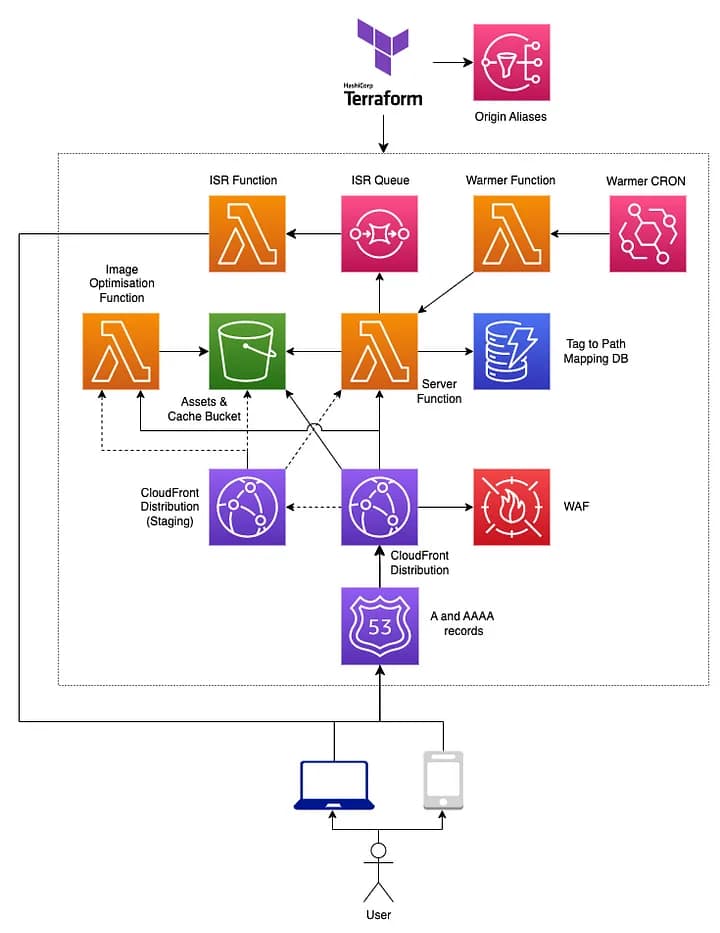
The module enables you to deploy your Next.js application using OpenNext efficiently with Lambda, S3, and CloudFront (diagram by Rob):
Terraform Module by Rob Pearson
Keep in mind, as of now, OpenNext only supports Amazon Web Services.
Terraform Module Setup
Here’s an example of how you can set up the Terraform module:
module "open-next_tf-aws-open-next-zone" {
  source      = "RJPearson94/open-next/aws//modules/tf-aws-open-next-zone"
  version     = "2.2.0"
  folder_path = ".open-next"
  providers = {
    aws                 = aws
    aws.global          = aws.global
    aws.iam             = aws.iam
    aws.dns             = aws.dns
    aws.server_function = aws.server_function
  }
  server_function = {
    vpc = {
      security_group_ids = [aws_security_group.lambda_sg.id]
      subnet_ids         = var.private_subnets
    }
  }
}
Configuration Explanation
An aspect that is immediately apparent is the configuration of providers. While it may look perplexing, it’s actually quite simple. The module takes into consideration your organizational structure, or the requirement that certain resources be in their respective accounts, enabling you to deploy different services to different accounts.
For example, you can provision your Lambda server functions within your private network for secure database connectivity. In addition to network configurations, you also have the option to configure the following:
- Route 53 (A and AAAA records)
- Server function (Lambda) customizations
- CloudFront staging distributions
- WAF (Web Application Firewall)
- Warmer function
- Image Optimization function
- Tag to Path Mapping DB
Preparing the Package
Before executing Terraform to provision infrastructure resources, you need to
generate the package for your application. If we look closely at the module
arguments, you’ll notice folder_path, which points to a hidden directory named
.open-next generated by OpenNext. To generate this package, run the following
command:
npx open-next@latest buildThis command automatically detects your Next.js application. OpenNext first
builds your application (running npm run build in the background), and upon
successful build, converts it into a package that can be deployed to AWS Lambda.
The Terraform module then takes the .open-next directory and deploys it as
part of your Lambda functions, along with CloudFront, S3, and other resources.
Once that's done, you can run the Terraform configuration to provision your
resources:
terraform init
terraform plan
terraform apply
Conclusion
In conclusion, transitioning from Vercel to AWS infrastructure with OpenNext and Terraform offers developers a robust solution for deploying Next.js applications with enhanced flexibility and control. While Vercel excels in frontend-focused deployments, its limitations in handling complex backend needs and scalability challenges necessitate exploring alternative approaches.
OpenNext bridges this gap by providing a framework-agnostic serverless adapter tailored for Next.js applications, complemented by Terraform’s infrastructure-as-code capabilities.
By leveraging these tools, developers can overcome the constraints of traditional hosting platforms, empower their projects with scalable backend functionalities, and seamlessly manage their infrastructure on AWS. With a deeper understanding of these technologies, developers are equipped to embark on their journey to deploy Next.js applications with confidence and efficiency.